> ## Documentation Index
> Fetch the complete documentation index at: https://agno-v2-service-account.mintlify.site/llms.txt
> Use this file to discover all available pages before exploring further.
# LangDB
> Send Agno agent runs, team runs, and tool-call traces to LangDB.
## Integrating Agno with LangDB
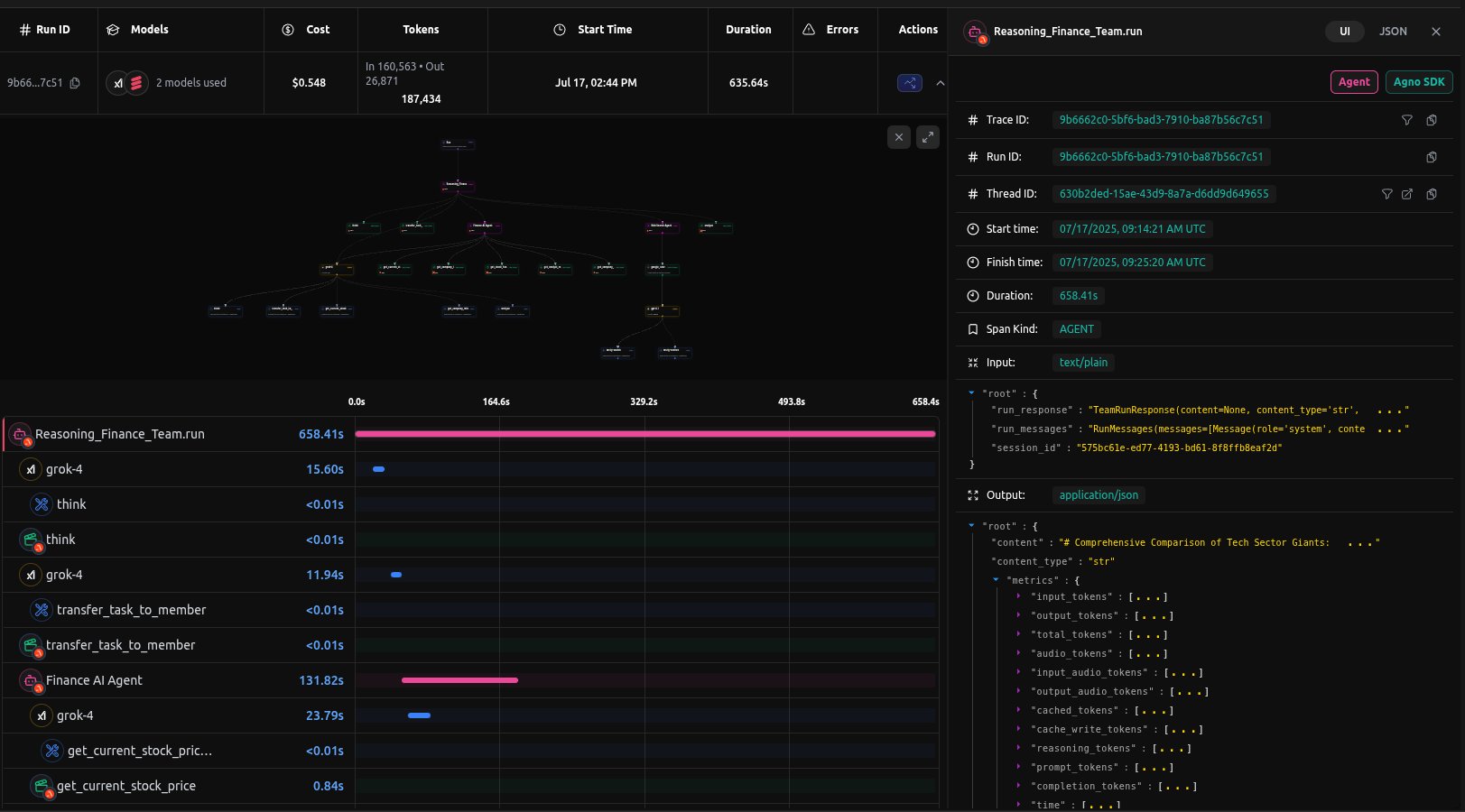
[LangDB](https://langdb.ai/) traces Agno agent runs, tool calls, team interactions, and model metrics.
For detailed integration instructions, see the [LangDB Agno documentation](https://docs.langdb.ai/getting-started/working-with-agent-frameworks/working-with-agno).
 ## Prerequisites
1. **Install Dependencies**
Ensure you have the necessary packages installed:
```bash theme={null}
uv pip install agno 'pylangdb[agno]' openai yfinance
```
2. **Setup LangDB Account**
* Sign up for an account at [LangDB](https://app.langdb.ai/signup)
* Create a new project in the LangDB dashboard
* Obtain your API key and Project ID from the project settings
3. **Set Environment Variables**
Configure your environment with the LangDB credentials:
```bash theme={null}
export LANGDB_API_KEY=""
export LANGDB_PROJECT_ID=""
```
## Sending Traces to LangDB
### Example: Basic Agent Setup
Instrument your Agno agent with LangDB tracing.
```python theme={null}
from pylangdb.agno import init
# Initialize LangDB tracing - must be called before creating agents
init()
from agno.agent import Agent
from agno.models.langdb import LangDB
from agno.tools.hackernews import HackerNewsTools
# Create agent with LangDB model (uses environment variables automatically)
agent = Agent(
name="Hacker News Research Agent",
model=LangDB(id="openai/gpt-4.1"),
tools=[HackerNewsTools()],
instructions="Answer questions using current Hacker News data."
)
# Use the agent
response = agent.run("What are the latest developments in AI agents?")
print(response)
```
### Example: Multi-Agent Team Coordination
For more complex workflows, you can use Agno's `Team` class with LangDB tracing:
```python theme={null}
from pylangdb.agno import init
init()
from agno.agent import Agent
from agno.team import Team
from agno.models.langdb import LangDB
from agno.tools.hackernews import HackerNewsTools
from agno.tools.yfinance import YFinanceTools
# Research Agent
web_agent = Agent(
name="Market Research Agent",
model=LangDB(id="openai/gpt-4.1"),
tools=[HackerNewsTools()],
instructions="Research current market conditions and news"
)
# Financial Analysis Agent
finance_agent = Agent(
name="Financial Analyst",
model=LangDB(id="xai/grok-4"),
tools=[YFinanceTools(enable_stock_price=True, enable_company_info=True)],
instructions="Perform quantitative financial analysis"
)
# Coordinated Team
reasoning_team = Team(
name="Finance Reasoning Team",
model=LangDB(id="xai/grok-4"),
members=[web_agent, finance_agent],
instructions=[
"Collaborate to provide comprehensive financial insights",
"Consider both fundamental analysis and market sentiment"
]
)
# Execute team workflow
reasoning_team.print_response("Analyze Apple (AAPL) investment potential")
```
## Sample Trace
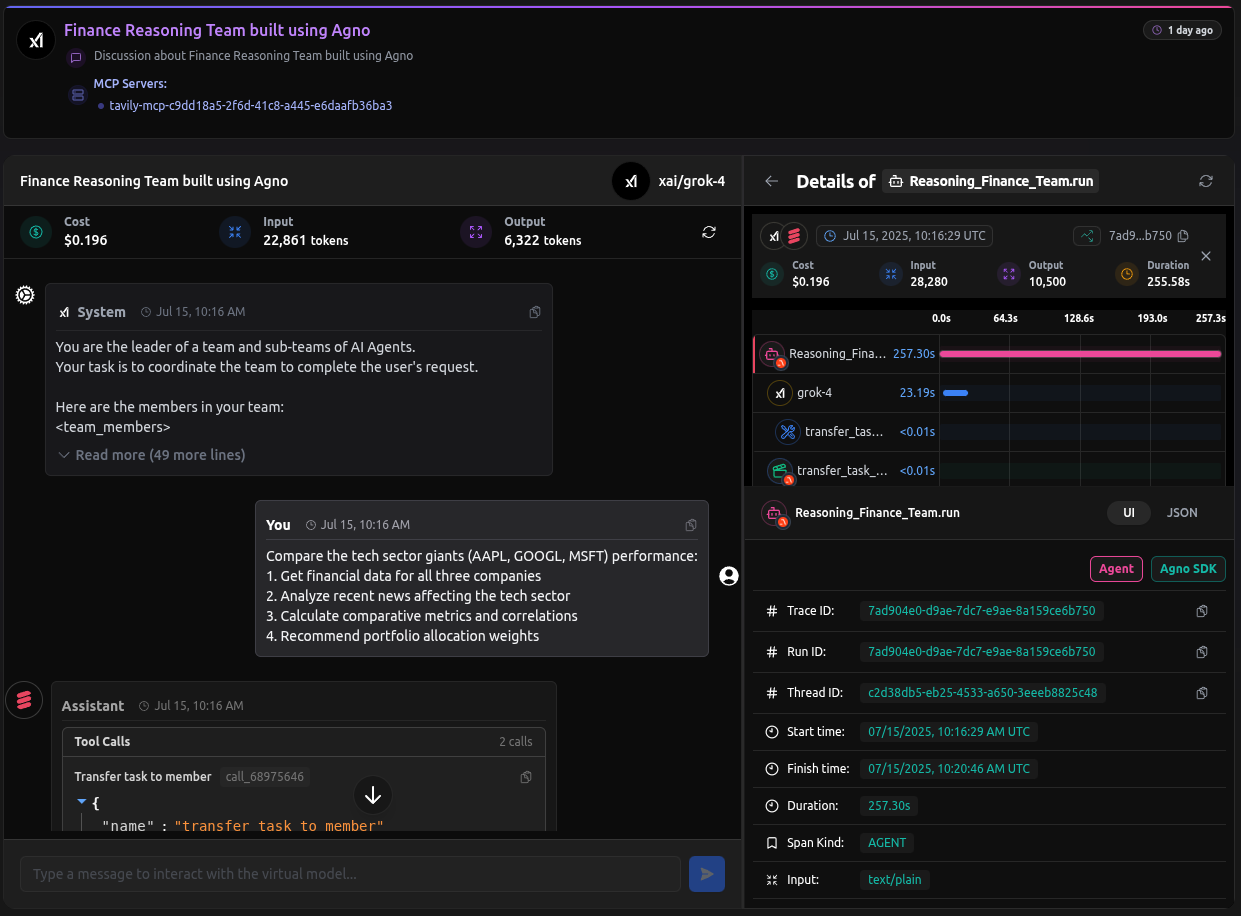
View a complete example trace in the LangDB dashboard: [Finance Reasoning Team Trace](https://app.langdb.ai/sharing/threads/73c91c58-eab7-4c6b-afe1-5ab6324f1ada)
## Prerequisites
1. **Install Dependencies**
Ensure you have the necessary packages installed:
```bash theme={null}
uv pip install agno 'pylangdb[agno]' openai yfinance
```
2. **Setup LangDB Account**
* Sign up for an account at [LangDB](https://app.langdb.ai/signup)
* Create a new project in the LangDB dashboard
* Obtain your API key and Project ID from the project settings
3. **Set Environment Variables**
Configure your environment with the LangDB credentials:
```bash theme={null}
export LANGDB_API_KEY=""
export LANGDB_PROJECT_ID=""
```
## Sending Traces to LangDB
### Example: Basic Agent Setup
Instrument your Agno agent with LangDB tracing.
```python theme={null}
from pylangdb.agno import init
# Initialize LangDB tracing - must be called before creating agents
init()
from agno.agent import Agent
from agno.models.langdb import LangDB
from agno.tools.hackernews import HackerNewsTools
# Create agent with LangDB model (uses environment variables automatically)
agent = Agent(
name="Hacker News Research Agent",
model=LangDB(id="openai/gpt-4.1"),
tools=[HackerNewsTools()],
instructions="Answer questions using current Hacker News data."
)
# Use the agent
response = agent.run("What are the latest developments in AI agents?")
print(response)
```
### Example: Multi-Agent Team Coordination
For more complex workflows, you can use Agno's `Team` class with LangDB tracing:
```python theme={null}
from pylangdb.agno import init
init()
from agno.agent import Agent
from agno.team import Team
from agno.models.langdb import LangDB
from agno.tools.hackernews import HackerNewsTools
from agno.tools.yfinance import YFinanceTools
# Research Agent
web_agent = Agent(
name="Market Research Agent",
model=LangDB(id="openai/gpt-4.1"),
tools=[HackerNewsTools()],
instructions="Research current market conditions and news"
)
# Financial Analysis Agent
finance_agent = Agent(
name="Financial Analyst",
model=LangDB(id="xai/grok-4"),
tools=[YFinanceTools(enable_stock_price=True, enable_company_info=True)],
instructions="Perform quantitative financial analysis"
)
# Coordinated Team
reasoning_team = Team(
name="Finance Reasoning Team",
model=LangDB(id="xai/grok-4"),
members=[web_agent, finance_agent],
instructions=[
"Collaborate to provide comprehensive financial insights",
"Consider both fundamental analysis and market sentiment"
]
)
# Execute team workflow
reasoning_team.print_response("Analyze Apple (AAPL) investment potential")
```
## Sample Trace
View a complete example trace in the LangDB dashboard: [Finance Reasoning Team Trace](https://app.langdb.ai/sharing/threads/73c91c58-eab7-4c6b-afe1-5ab6324f1ada)
 ## Advanced Features
### LangDB Capabilities
* **Virtual Models**: Save and reuse model configurations with prompts, parameters, tools, and routing logic.
* **MCP Support**: Attach Model Context Protocol servers to models.
* **Multi-Provider**: Route requests to OpenAI, Anthropic, Google, xAI, and other providers.
## Notes
* **Initialization Order**: Always call `init()` before creating any Agno agents or teams
* **Environment Variables**: With `LANGDB_API_KEY` and `LANGDB_PROJECT_ID` set, you can create models with just `LangDB(id="model_name")`
## Resources
* [LangDB Documentation](https://docs.langdb.ai/)
* [Building a Reasoning Finance Team Guide](https://docs.langdb.ai/guides/building-agents/building-a-reasoning-finance-team-with-agno)
* [LangDB GitHub Samples](https://github.com/langdb/langdb-samples/tree/main/examples/agno)
* [LangDB Dashboard](https://app.langdb.ai/)
## Advanced Features
### LangDB Capabilities
* **Virtual Models**: Save and reuse model configurations with prompts, parameters, tools, and routing logic.
* **MCP Support**: Attach Model Context Protocol servers to models.
* **Multi-Provider**: Route requests to OpenAI, Anthropic, Google, xAI, and other providers.
## Notes
* **Initialization Order**: Always call `init()` before creating any Agno agents or teams
* **Environment Variables**: With `LANGDB_API_KEY` and `LANGDB_PROJECT_ID` set, you can create models with just `LangDB(id="model_name")`
## Resources
* [LangDB Documentation](https://docs.langdb.ai/)
* [Building a Reasoning Finance Team Guide](https://docs.langdb.ai/guides/building-agents/building-a-reasoning-finance-team-with-agno)
* [LangDB GitHub Samples](https://github.com/langdb/langdb-samples/tree/main/examples/agno)
* [LangDB Dashboard](https://app.langdb.ai/)