

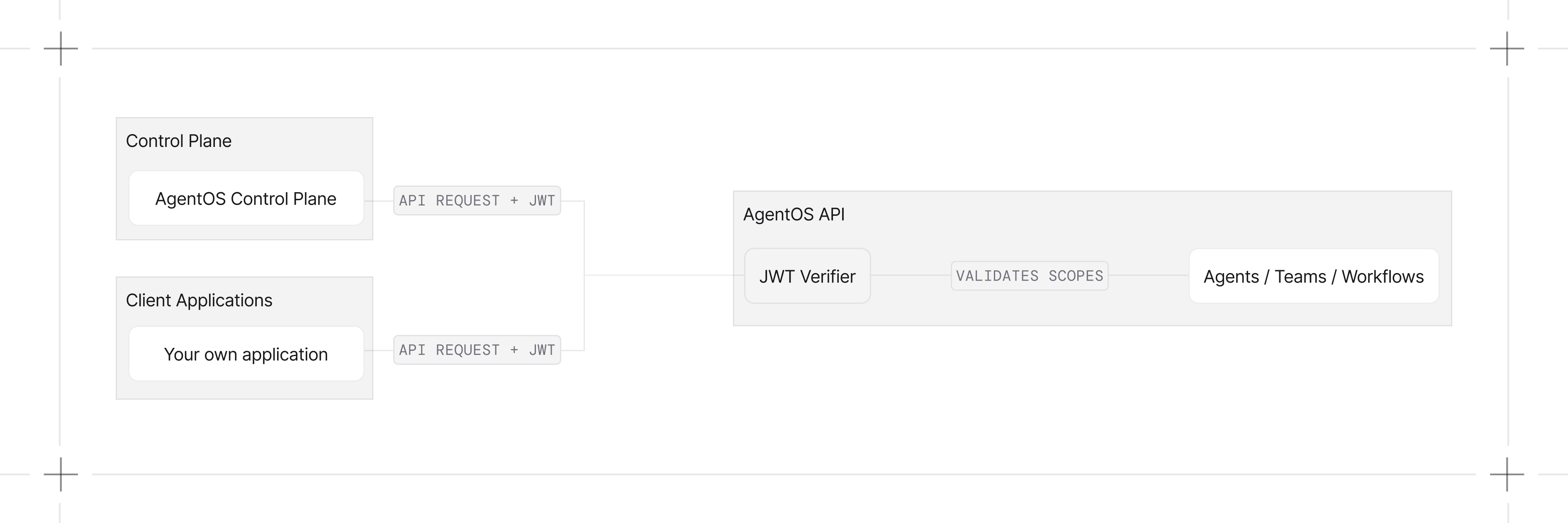
Key Concepts
Learn How To
Quickstart
Enable authorization, set a verification key, and make your first authenticated request.
JSON Web Tokens (JWT)
JWT claim structure, example tokens, and how AgentOS reads them.
Self-Hosted (BYO Token)
Run AgentOS without the control plane by issuing and verifying your own JWTs.
Scopes
Scope format and the full permission reference for every AgentOS endpoint.
Roles
Default roles and custom roles defined in the control plane.
Per-User Data Isolation
Scope sessions, memories, and traces to the caller’s user ID.
Service Accounts
Mint, scope, and revoke opaque machine tokens.
Examples
Basic Authorization (Symmetric)
Enable authorization with a shared-secret JWT (HS256).
Basic Authorization (Asymmetric)
Sign with a private key, verify with the public key (RS256).
Per-Agent Permissions
Grant specific permissions to specific agents.
Per-User Data Isolation
Scope sessions, memory, and traces per user with
user_isolation=True.Developer Resources
JWT Middleware
Configure token sources, claim extraction, and scope checking.
AuthorizationConfig Reference
Configuration options for JWT verification.
JWTMiddleware Reference
Complete JWT middleware class reference.