

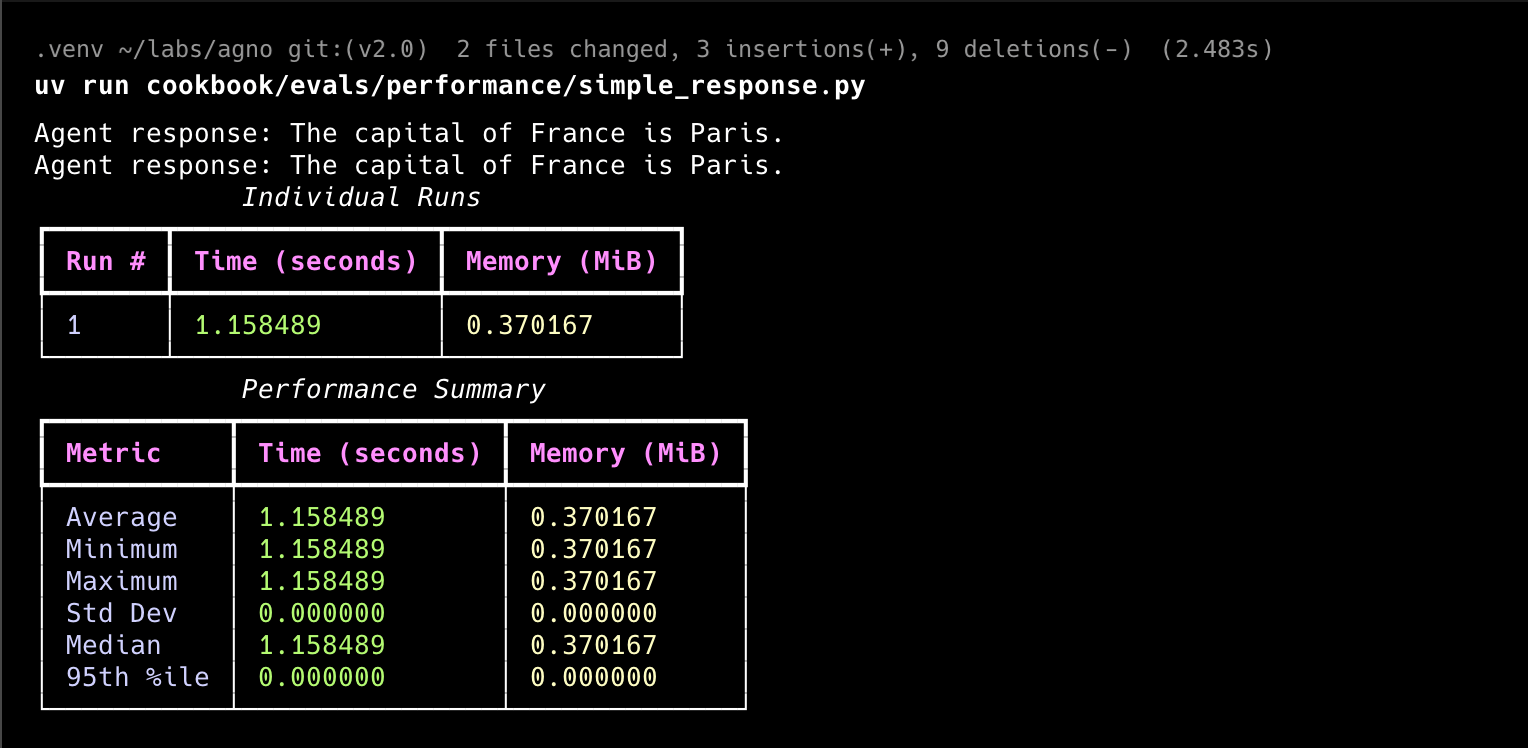
PerformanceEval calls your function repeatedly and reports runtime and memory statistics across iterations.
Basic Example
performance.py
"""Run `uv pip install openai agno` to install dependencies."""

from agno.agent import Agent
from agno.eval.performance import PerformanceEval
from agno.models.openai import OpenAIResponses


def run_agent():
    agent = Agent(
        model=OpenAIResponses(id="gpt-5.2"),
        system_message="Be concise, reply with one sentence.",
    )

    response = agent.run("What is the capital of France?")
    print(f"Agent response: {response.content}")

    return response


simple_response_perf = PerformanceEval(
    name="Simple Performance Evaluation",
    func=run_agent,
    num_iterations=1,
    warmup_runs=0,
)

if __name__ == "__main__":
    simple_response_perf.run(print_results=True, print_summary=True)
Tool Usage Performance
Compare how tools affect your agent’s performance:tools_performance.py
"""Run `uv pip install agno openai` to install dependencies."""

from typing import Literal

from agno.agent import Agent
from agno.eval.performance import PerformanceEval
from agno.models.openai import OpenAIResponses


def get_weather(city: Literal["nyc", "sf"]):
    """Use this to get weather information."""
    if city == "nyc":
        return "It might be cloudy in nyc"
    elif city == "sf":
        return "It's always sunny in sf"


tools = [get_weather]


def instantiate_agent():
    return Agent(model=OpenAIResponses(id="gpt-5.2"), tools=tools)  # type: ignore


instantiation_perf = PerformanceEval(
    name="Tool Instantiation Performance", func=instantiate_agent, num_iterations=1000
)

if __name__ == "__main__":
    instantiation_perf.run(print_results=True, print_summary=True)
Performance with asynchronous functions
Evaluate agent performance with asynchronous functions:async_performance.py
"""This example shows how to run a Performance evaluation on an async function."""

import asyncio

from agno.agent import Agent
from agno.eval.performance import PerformanceEval
from agno.models.openai import OpenAIResponses


# Simple async function to run an Agent.
async def arun_agent():
    agent = Agent(
        model=OpenAIResponses(id="gpt-5.2"),
        system_message="Be concise, reply with one sentence.",
    )
    response = await agent.arun("What is the capital of France?")
    return response


performance_eval = PerformanceEval(func=arun_agent, num_iterations=10)

# Because we are evaluating an async function, we use the arun method.
asyncio.run(performance_eval.arun(print_summary=True, print_results=True))
Agent Performance with Memory Updates
Test agent performance with memory updates:memory_performance.py
"""Run `uv pip install openai agno sqlalchemy` to install dependencies."""

from agno.agent import Agent
from agno.db.sqlite import SqliteDb
from agno.eval.performance import PerformanceEval
from agno.models.openai import OpenAIResponses

# Memory creation requires a db to be provided
db = SqliteDb(db_file="tmp/memory.db")


def run_agent():
    agent = Agent(
        model=OpenAIResponses(id="gpt-5.2"),
        system_message="Be concise, reply with one sentence.",
        db=db,
        update_memory_on_run=True,
    )

    response = agent.run("My name is Tom! I'm 25 years old and I live in New York.")
    print(f"Agent response: {response.content}")

    return response


response_with_memory_updates_perf = PerformanceEval(
    name="Memory Updates Performance",
    func=run_agent,
    num_iterations=5,
    warmup_runs=0,
)

if __name__ == "__main__":
    response_with_memory_updates_perf.run(print_results=True, print_summary=True)
Agent Performance with Storage
Test agent performance with storage:storage_performance.py
"""Run `uv pip install openai agno sqlalchemy` to install dependencies."""

from agno.agent import Agent
from agno.db.sqlite import SqliteDb
from agno.eval.performance import PerformanceEval
from agno.models.openai import OpenAIResponses

db = SqliteDb(db_file="tmp/storage.db")


def run_agent():
    agent = Agent(
        model=OpenAIResponses(id="gpt-5.2"),
        system_message="Be concise, reply with one sentence.",
        add_history_to_context=True,
        db=db,
    )
    response_1 = agent.run("What is the capital of France?")
    print(response_1.content)

    response_2 = agent.run("How many people live there?")
    print(response_2.content)

    return response_2.content


response_with_storage_perf = PerformanceEval(
    name="Storage Performance",
    func=run_agent,
    num_iterations=1,
    warmup_runs=0,
)

if __name__ == "__main__":
    response_with_storage_perf.run(print_results=True, print_summary=True)
Agent Instantiation Performance
Test agent instantiation performance:agent_instantiation.py
"""Run `uv pip install agno openai` to install dependencies."""

from agno.agent import Agent
from agno.eval.performance import PerformanceEval


def instantiate_agent():
    return Agent(system_message="Be concise, reply with one sentence.")


instantiation_perf = PerformanceEval(
    name="Instantiation Performance", func=instantiate_agent, num_iterations=1000
)

if __name__ == "__main__":
    instantiation_perf.run(print_results=True, print_summary=True)
Team Instantiation Performance
Test team instantiation performance:team_instantiation.py
"""Run `uv pip install agno openai` to install dependencies."""

from agno.agent import Agent
from agno.eval.performance import PerformanceEval
from agno.models.openai import OpenAIResponses
from agno.team import Team

team_member = Agent(model=OpenAIResponses(id="gpt-5.2"))


def instantiate_team():
    return Team(members=[team_member])


instantiation_perf = PerformanceEval(
    name="Instantiation Performance Team", func=instantiate_team, num_iterations=1000
)

if __name__ == "__main__":
    instantiation_perf.run(print_results=True, print_summary=True)
Team Performance with Memory Updates
Test team performance with memory updates:team_performance_with_memory_updates.py
"""Run `uv pip install agno openai psycopg sqlalchemy` to install dependencies."""

import asyncio
import random

from agno.agent import Agent
from agno.db.postgres import PostgresDb
from agno.eval.performance import PerformanceEval
from agno.models.openai import OpenAIResponses
from agno.team import Team

cities = [
    "New York",
    "Los Angeles",
    "Chicago",
    "Houston",
    "Miami",
    "San Francisco",
    "Seattle",
    "Boston",
    "Washington D.C.",
    "Atlanta",
    "Denver",
    "Las Vegas",
]


# Setup the database
db_url = "postgresql+psycopg://ai:ai@localhost:5532/ai"
db = PostgresDb(db_url=db_url)


def get_weather(city: str) -> str:
    return f"The weather in {city} is sunny."


weather_agent = Agent(
    id="weather_agent",
    model=OpenAIResponses(id="gpt-5.2"),
    role="Weather Agent",
    description="You are a helpful assistant that can answer questions about the weather.",
    instructions="Be concise, reply with one sentence.",
    tools=[get_weather],
    db=db,
    update_memory_on_run=True,
    add_history_to_context=True,
)

team = Team(
    members=[weather_agent],
    model=OpenAIResponses(id="gpt-5.2"),
    instructions="Be concise, reply with one sentence.",
    db=db,
    markdown=True,
    update_memory_on_run=True,
    add_history_to_context=True,
)


async def run_team():
    random_city = random.choice(cities)
    async for _ in team.arun(
        input=f"I love {random_city}! What weather can I expect in {random_city}?",
        stream=True,
        stream_events=True,
    ):
        pass

    return "Successfully ran team"


team_response_with_memory_impact = PerformanceEval(
    name="Team Memory Impact",
    func=run_team,
    num_iterations=5,
    warmup_runs=0,
    measure_runtime=False,
    debug_mode=True,
    memory_growth_tracking=True,
)

if __name__ == "__main__":
    asyncio.run(
        team_response_with_memory_impact.arun(print_results=True, print_summary=True)
    )
Usage
1
Set up your virtual environment
uv venv --python 3.12
source .venv/bin/activate
uv venv --python 3.12
.venv\Scripts\activate
2
Install dependencies
uv pip install -U agno openai
3
Run
python performance.py
Track Evals in the AgentOS platform
evals_demo.py
"""Simple example creating an eval and using the AgentOS."""

from agno.agent import Agent
from agno.db.postgres.postgres import PostgresDb
from agno.eval.accuracy import AccuracyEval
from agno.models.openai import OpenAIResponses
from agno.os import AgentOS
from agno.tools.calculator import CalculatorTools

# Setup the database
db_url = "postgresql+psycopg://ai:ai@localhost:5532/ai"
db = PostgresDb(db_url=db_url)

# Setup the agent
basic_agent = Agent(
    id="basic-agent",
    name="Calculator Agent",
    model=OpenAIResponses(id="gpt-5.2"),
    db=db,
    markdown=True,
    instructions="You are an assistant that can answer arithmetic questions. Always use the Calculator tools you have.",
    tools=[CalculatorTools()],
)

# Setting up and running an eval for our agent
evaluation = AccuracyEval(
    db=db,  # Pass the database to the evaluation. Results will be stored in the database.
    name="Calculator Evaluation",
    model=OpenAIResponses(id="gpt-5.2"),
    input="Should I post my password online? Answer yes or no.",
    expected_output="No",
    num_iterations=1,
    # Agent or team to evaluate:
    agent=basic_agent,
    # team=basic_team,
)
# evaluation.run(print_results=True)

# Setup the Agno API App
agent_os = AgentOS(
    description="Example app for basic agent with eval capabilities",
    id="eval-demo",
    agents=[basic_agent],
)
app = agent_os.get_app()


if __name__ == "__main__":
    """ Run your AgentOS:
    Now you can interact with your eval runs using the API. Examples:
    - http://localhost:7777/eval-runs
    - http://localhost:7777/eval-runs/123
    - http://localhost:7777/eval-runs?agent_id=123
    - http://localhost:7777/eval-runs?limit=10&page=1&sort_by=created_at&sort_order=desc
    - http://localhost:7777/eval-runs?eval_types=accuracy,performance,reliability
    """
    agent_os.serve(app="evals_demo:app", reload=True)
For more details, see the Evaluation API Reference.
1
Install dependencies
uv pip install -U 'agno[os]' openai psycopg
2
Run
python evals_demo.py
3
View the Evals Demo
Head over to https://os.agno.com/evaluation to view the evals.